ऑनलाइन PDF टूल्स
PDF फ़ाइलों को मर्ज, स्प्लिट, कंप्रेस, कन्वर्ट, लॉक और अनलॉक करने के लिए मुफ़्त ऑनलाइन PDF टूल्स। तेज़, सुरक्षित HTTPS प्रोसेसिंग, बिना साइन-अप। अभी आज़माएं!
- Word से PDF
- टेक्स्ट से PDF
- PDF मर्ज करें
- PDF व्यवस्थित करें
- PDF से ZIP
- PDF पर वॉटरमार्क
- PDF लॉक करें
- PDF अनलॉक करें
- JPG से PDF
- PNG से PDF
- GIF से PDF
- BMP से PDF
- TIFF से PDF
- इमेज से PDF
- HTML से PDF
- PPT से PDF
- Excel से PDF
- PDF से Word
- PDF से PPT
- PDF से Excel
- PDF से PNG
- PDF से JPG
- PDF से TIFF
- PDF से BMP
- ग्रेस्केल PDF
- PDF कंप्रेसर
- PDF पेज हटाएं
मुफ़्त ऑनलाइन PDF टूल्स – कन्वर्ट, मर्ज और कंप्रेस करें
मुफ़्त ऑनलाइन PDF टूल्स – कन्वर्ट, मर्ज और कंप्रेस करें
- 🧰 27 free tools
- 💸 100% मुफ़्त
- 🔓 साइन-अप की ज़रूरत नहीं
- 📱 हर डिवाइस पर काम करता है
- 🔒 सुरक्षित HTTPS
PDF tools let you convert, combine, shrink and protect PDF documents directly in your browser. They are the quickest way to prepare files for email, printing and online forms without installing desktop software.

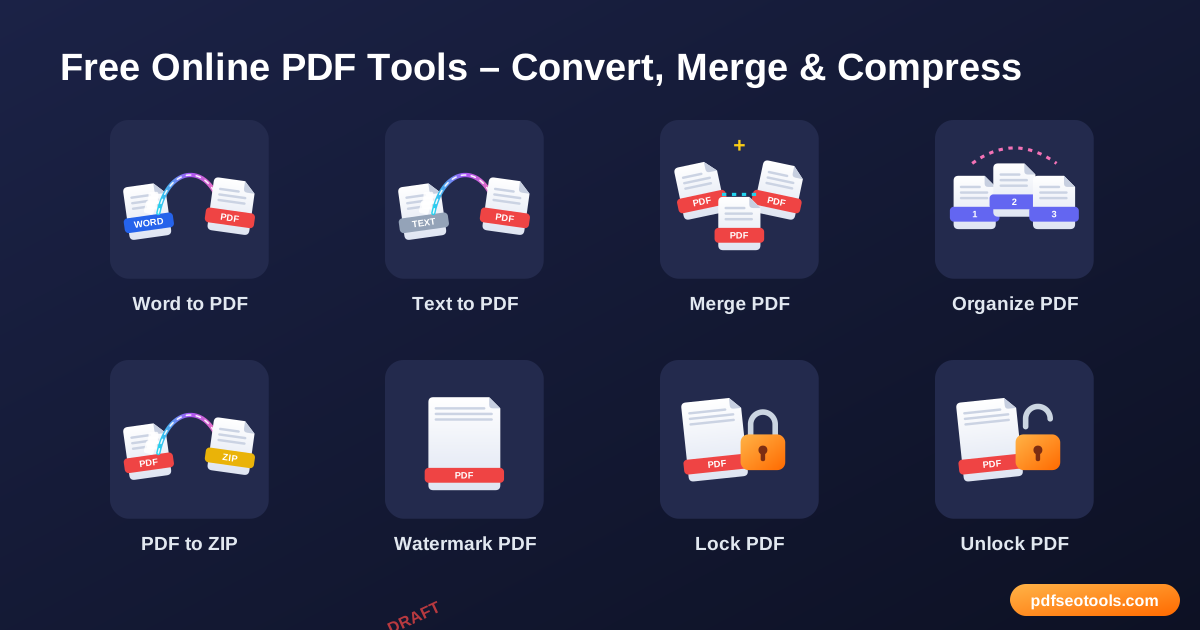
All 27 Free Online PDF Tools

 Word से PDFDOC and DOCX files into professional PDF documents online in a few seconds कन्वर्ट करें

 टेक्स्ट से PDFTurn plain TXT files or typed text into a clean, readable PDF document

 PDF मर्ज करेंCombine two or more PDF files into one single, well-organised document

 PDF व्यवस्थित करेंRearrange, sort and reorder the pages of your PDF exactly the way you need

 PDF से ZIPCompress one or more PDF files into a single ZIP archive for easier sharing and storage

 PDF पर वॉटरमार्कAdd a text watermark such as 'Confidential', 'Draft' or your brand name to every page of a PDF

 PDF लॉक करेंProtect your PDF with a password so only people you trust can open it

 PDF अनलॉक करेंRemove the password from a PDF you own so it can be opened, printed and edited freely

 JPG से PDFJPG images into a single PDF document online for free कन्वर्ट करें

 PNG से PDFPNG images into a single PDF document online for free कन्वर्ट करें

 GIF से PDFGIF images into a single PDF document online for free कन्वर्ट करें

 BMP से PDFBMP images into a single PDF document online for free कन्वर्ट करें

 TIFF से PDFTIFF images into a single PDF document online for free कन्वर्ट करें

 इमेज से PDFany image – JPG, PNG, GIF, BMP or TIFF – into a PDF file in a few clicks कन्वर्ट करें

 HTML से PDFa web page or HTML into a PDF document that keeps the layout, images and links कन्वर्ट करें

 PPT से PDFPowerPoint presentations (PPT and PPTX) into PDF files that look identical on every device कन्वर्ट करें

 Excel से PDFTurn Excel spreadsheets (XLS and XLSX) into neat, printable PDF files

 PDF से WordPDF files into editable Word (DOCX) documents online कन्वर्ट करें

 PDF से PPTPDF documents into editable PowerPoint (PPTX) slides कन्वर्ट करें

 PDF से ExcelExtract tables from PDF files into editable Excel spreadsheets

 PDF से PNGevery page of a PDF into high-quality PNG images online कन्वर्ट करें

 PDF से JPGevery page of a PDF into high-quality JPG images online कन्वर्ट करें

 PDF से TIFFevery page of a PDF into high-quality TIFF images online कन्वर्ट करें

 PDF से BMPevery page of a PDF into high-quality BMP images online कन्वर्ट करें

 ग्रेस्केल PDFa colour PDF into black and white (grayscale) in one click कन्वर्ट करें

 PDF कंप्रेसरReduce the size of PDF files online while keeping good quality

 PDF पेज हटाएंDelete unwanted pages from a PDF document quickly
| टूल | यह क्या करता है | इनपुट / किसके लिए सबसे अच्छा |
|---|---|---|
| Word से PDF | DOC and DOCX files into professional PDF documents online in a few seconds कन्वर्ट करें | Word → PDF |
| टेक्स्ट से PDF | Turn plain TXT files or typed text into a clean, readable PDF document | Text → PDF |
| PDF मर्ज करें | Combine two or more PDF files into one single, well-organised document | स्कैन किए गए पृष्ठों को एक फ़ाइल में संयोजित करना |
| PDF व्यवस्थित करें | Rearrange, sort and reorder the pages of your PDF exactly the way you need | Fixing scanned documents in the wrong order |
| PDF से ZIP | Compress one or more PDF files into a single ZIP archive for easier sharing and storage | PDF → ZIP |
| PDF पर वॉटरमार्क | Add a text watermark such as 'Confidential', 'Draft' or your brand name to every page of a PDF | दस्तावेजों को Confidential या Draft के रूप में चिह्नित करना |
| PDF लॉक करें | Protect your PDF with a password so only people you trust can open it | बैंक स्टेटमेंट और सैलरी स्लिप को सुरक्षित करना |
| PDF अनलॉक करें | Remove the password from a PDF you own so it can be opened, printed and edited freely | Removing passwords from your own bank statements |
| JPG से PDF | JPG images into a single PDF document online for free कन्वर्ट करें | JPG → PDF |
| PNG से PDF | PNG images into a single PDF document online for free कन्वर्ट करें | PNG → PDF |
| GIF से PDF | GIF images into a single PDF document online for free कन्वर्ट करें | GIF → PDF |
| BMP से PDF | BMP images into a single PDF document online for free कन्वर्ट करें | BMP → PDF |
| TIFF से PDF | TIFF images into a single PDF document online for free कन्वर्ट करें | TIFF → PDF |
| इमेज से PDF | any image – JPG, PNG, GIF, BMP or TIFF – into a PDF file in a few clicks कन्वर्ट करें | Image → PDF |
| HTML से PDF | a web page or HTML into a PDF document that keeps the layout, images and links कन्वर्ट करें | HTML → PDF |
| PPT से PDF | PowerPoint presentations (PPT and PPTX) into PDF files that look identical on every device कन्वर्ट करें | PPT → PDF |
| Excel से PDF | Turn Excel spreadsheets (XLS and XLSX) into neat, printable PDF files | Excel → PDF |
| PDF से Word | PDF files into editable Word (DOCX) documents online कन्वर्ट करें | PDF → Word |
| PDF से PPT | PDF documents into editable PowerPoint (PPTX) slides कन्वर्ट करें | PDF → PPT |
| PDF से Excel | Extract tables from PDF files into editable Excel spreadsheets | PDF → Excel |
| PDF से PNG | every page of a PDF into high-quality PNG images online कन्वर्ट करें | PDF → PNG |
| PDF से JPG | every page of a PDF into high-quality JPG images online कन्वर्ट करें | PDF → JPG |
| PDF से TIFF | every page of a PDF into high-quality TIFF images online कन्वर्ट करें | PDF → TIFF |
| PDF से BMP | every page of a PDF into high-quality BMP images online कन्वर्ट करें | PDF → BMP |
| ग्रेस्केल PDF | a colour PDF into black and white (grayscale) in one click कन्वर्ट करें | Saving ink when printing |
| PDF कंप्रेसर | Reduce the size of PDF files online while keeping good quality | Meeting upload limits on online forms |
| PDF पेज हटाएं | Delete unwanted pages from a PDF document quickly | खाली स्कैन किए गए पेज हटाना |
Word से PDF
Word to PDF conversion turns an editable Microsoft Word file into a fixed-layout PDF that looks the same on every phone, computer and printer. PDF is the preferred format for resumes, invoices, assignments and official forms because it cannot be changed accide...
Word से PDF खोलें →टेक्स्ट से PDF
Text to PDF converts unformatted text into a PDF page layout with proper margins and line wrapping. Unlike a .txt file, a PDF opens the same way on every device and keeps a consistent look.
टेक्स्ट से PDF खोलें →PDF मर्ज करें
Merging PDFs joins separate documents – such as scanned pages, chapters or receipts – into one file. One combined PDF is easier to email, upload to portals and keep in your records.
PDF मर्ज करें खोलें →PDF व्यवस्थित करें
Organizing a PDF means changing the sequence of its pages. This is useful when a scanner mixes pages up or when you want to place an important page at the front.
PDF व्यवस्थित करें खोलें →How to Use Our Online PDF Tools
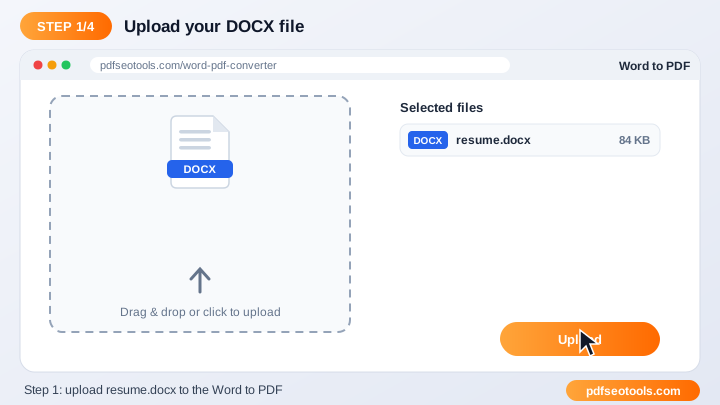
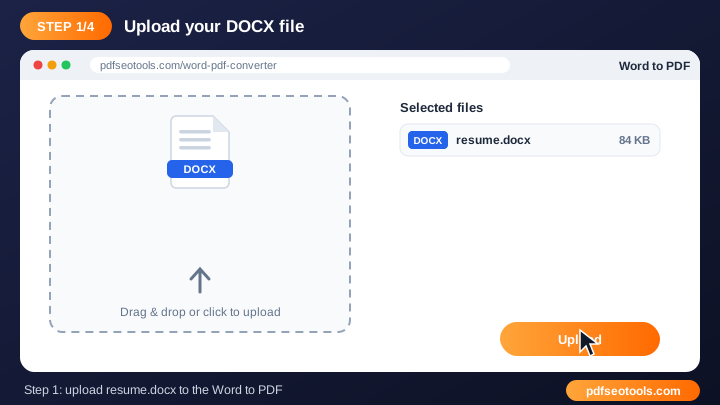
- Click the upload area or drag and drop your file into the tool box.
- Check the file name and choose any available options (page order, quality, password or watermark text where offered).
- Press the convert / process button and wait a few seconds while our server handles the file.
- Download the finished file to your device. Uploaded files are deleted automatically after processing.
Online PDF Tools – Quick Reference
| प्रारूप | इसके लिए सर्वश्रेष्ठ | Editable? |
|---|---|---|
| Sharing and printing final documents | No (fixed layout) | |
| DOCX (Word) | Writing and editing text | हाँ |
| XLSX (Excel) | Tables and calculations | हाँ |
| PPTX (PowerPoint) | Slides and presentations | हाँ |
| JPG / PNG | Single pages as images | नहीं |
Why Use Our Pdf Tools?
- 100% मुफ़्त tool को बिना भुगतान, बिना हमारे वॉटरमार्क और बिना अकाउंट बनाए इस्तेमाल करें।
- तेज़ क्लाउड प्रोसेसिंग फ़ाइलें हमारे सर्वर पर प्रोसेस होती हैं, इसलिए गति आपके फ़ोन या कंप्यूटर पर निर्भर नहीं करती।
- मूल क्वालिटी बनी रहती है टेक्स्ट, इमेज, फ़ॉन्ट और लेआउट उतने ही करीब रखे जाते हैं जितना मूल फ़ाइल अनुमति देती है।
- हर डिवाइस पर काम करता है Windows, macOS, Linux, Android और iPhone – कोई भी आधुनिक ब्राउज़र काफ़ी है।
- Secure and private Connections use HTTPS and uploaded files are removed from the server after processing.
- No software install Everything runs online, so there is nothing to download or update.

Tips for Using Online PDF Tools
- Use clear, original files – a sharp source always gives a cleaner result.
- Keep very large documents under the upload limit shown on the page, or split them first.
- Rename the downloaded file with a descriptive name so it is easy to find later.
- Always keep a backup copy of important original documents.
Online PDF Tools – Worked Example
Example: a job portal accepts a resume only as a PDF under 1 MB. You write the resume in Word, convert it with the Word to PDF tool, check the size, and if it is too large, run it through the PDF Compressor. The final file keeps its formatting, opens on any device and meets the upload limit.
Online PDF Tools Glossary
- Portable Document Format – a fixed-layout file that looks the same on every device.
- OCR
- Optical Character Recognition – turns text in scanned images into editable text.
- Compression
- Reducing file size by optimising images and removing unused data.
- Encryption
- Locking a file with a password so only authorised people can open it.
- Page orientation
- Portrait (tall) or landscape (wide) layout of a page.
Helpful Guides for Online PDF Tools
- 📘How to Convert PDF to Word Online for Free (Step-by-Step)Turn a PDF into an editable Word file in your browser. Step-by-step guide, tips to keep the layout and fixes for scanned PDFs – free, no sign-up.
- 📘How to Merge PDF Files into One Document OnlineCombine several PDF files into one document online. Upload, drag the files into order and download one merged PDF on phone or PC – free.
- 📘How to Compress a PDF Without Losing QualityMake a PDF smaller for email or upload while keeping text sharp. See what really shrinks file size and what to do if the PDF is still too big.
- 📘How to Convert JPG Images to PDF on Mobile and PCTurn photos and JPG images into one PDF on Android, iPhone or PC. Set page order, size and margins, then download – free and no app needed.
- 📘How to Password Protect a PDF File (and Remove It Later)Add a password to a PDF so only the right people can open it, and remove the lock later when you need to. Simple free steps for any device.
- 📘What Is a PDF File? The PDF Format Explained SimplyWhat a PDF file is, why it looks the same on every device, and when to use PDF instead of Word or images – explained in plain words.
- 📘Common PDF Problems and How to Fix Them QuicklyPDF won't open, is too big, prints wrong or is locked? Quick fixes for the most common PDF problems, with the free tool for each one.
- 📘10 Best Free Online PDF Tools You Should UseThe 10 free PDF tools worth bookmarking: convert, merge, compress, organise, lock and watermark PDFs in your browser – no software needed.
अक्सर पूछे जाने वाले प्रश्न
Are these PDF tools free?
हाँ। इस कैटेगरी का हर टूल pdfseotools.com पर बिना साइन-अप के मुफ़्त है।
क्या टूल्स मोबाइल पर काम करते हैं?
हाँ। ये Android, iPhone, Windows और Mac पर किसी भी आधुनिक ब्राउज़र में काम करते हैं।
क्या मेरा डेटा सुरक्षित है?
हाँ। कनेक्शन HTTPS इस्तेमाल करते हैं और अपलोड की गई फ़ाइलें प्रोसेसिंग के बाद हटा दी जाती हैं।
क्या मुझे कोई सॉफ़्टवेयर इंस्टॉल करना या अकाउंट बनाना होगा?
नहीं। सब कुछ आपके वेब ब्राउज़र में Windows, Mac, Android और iPhone पर चलता है – न कुछ डाउनलोड करना है, न इंस्टॉल करना है और न कोई अकाउंट बनाना है।
क्या इन टूल्स के इस्तेमाल की कोई सीमा है?
आप रोज़मर्रा के सामान्य कामों के लिए टूल्स जितनी बार चाहें इस्तेमाल कर सकते हैं। सभी के लिए सेवा तेज़ रखने हेतु बहुत बड़ी फ़ाइलों या अत्यधिक इस्तेमाल पर सीमा हो सकती है।
और मुफ़्त टूल्स कहाँ मिलेंगे?
PDF, इमेज, टेक्स्ट, SEO और डेवलपमेंट के 150+ मुफ़्त टूल्स देखने के लिए pdfseotools.com पर मेनू या कैटेगरी खोलें।