
Common JSON Errors and How to Fix Them

Most developer tools problems come from a few simple causes: the wrong input, the wrong settings or a file or value that breaks a basic rule. This guide lists the most common problems, explains why they happen and shows how to fix each one in seconds.


Why These Problems Happen
Your data is parsed using a standards-compliant parser. If it is valid, it is transformed – formatted, converted or generated – and returned instantly. If it is invalid, the tool shows where the error is so you can fix it.
Because every tool follows strict rules, a small mistake in the input or settings can produce an error or an unexpected result. The good news is that almost every problem has a quick fix.
Problems and Fixes at a Glance
| Problem | Fix |
|---|---|
| Parse error | Check for missing commas, quotes or brackets near the line mentioned in the error. |
| Special characters break the output | Make sure the input uses UTF-8 encoding. |
| Output is too large to read | Use the collapse or formatting options, or process a smaller part of the data. |
| Using single quotes in JSON instead of double quotes | Avoid this – see the tips below |
| Leaving a trailing comma after the last item | Avoid this – see the tips below |
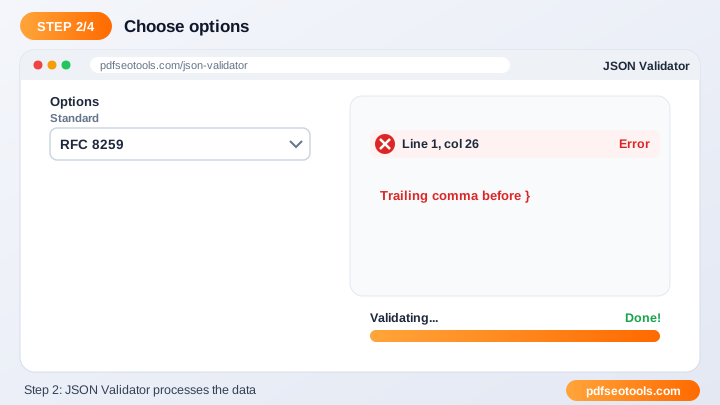
Problem 1: Parse error
Check for missing commas, quotes or brackets near the line mentioned in the error. If the problem continues, test with a small, simple input first, then try your full file or value again.
Problem 2: Special characters break the output
Make sure the input uses UTF-8 encoding. If the problem continues, test with a small, simple input first, then try your full file or value again.
Problem 3: Output is too large to read
Use the collapse or formatting options, or process a smaller part of the data. If the problem continues, test with a small, simple input first, then try your full file or value again.
Mistakes That Cause Most Errors
- Using single quotes in JSON instead of double quotes.
- Leaving a trailing comma after the last item.
- Pasting secrets such as API keys into shared snippets.
- Using placeholder data in production.
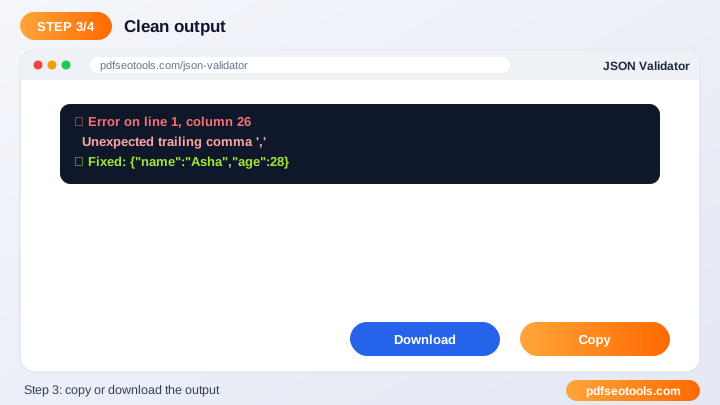
Use JSON Validator to Check Your Work
Validate JSON online and find syntax errors quickly. Open JSON Validator.
- Paste your code or data into the input box (or upload a file where supported).
- Choose any options such as indentation.
- Click the action button.
- Copy or download the output.
Prevention Checklist
- Validate data before using it in production.
- Keep sensitive keys and passwords out of shared snippets.
- Use consistent indentation across your project.
- Bookmark the tool for daily debugging.
Helpful Tools
- JSON Formatter – Format and pretty-print JSON with proper indentation online.
- JSON Editor – Edit JSON data online with a simple, structured editor.
- JSON Beautifier – Beautify messy or minified JSON into clean, readable code.
Related Tasks You Can Do
JSON Formatter
A JSON formatter adds line breaks and indentation to compact JSON so it is easy to read and debug. It is useful for reading api responses, cleaning config files, code reviews. Try JSON Formatter.
JSON Editor
A JSON editor lets you add, change and remove keys and values while keeping valid JSON syntax. It is useful for editing config files, creating test data, updating api payloads. Try JSON Editor.
JSON Beautifier
JSON beautification adds consistent indentation and spacing so data is easier to understand and share with your team. It is useful for readable logs, sharing examples, documentation. Try JSON Beautifier.
Worked Example
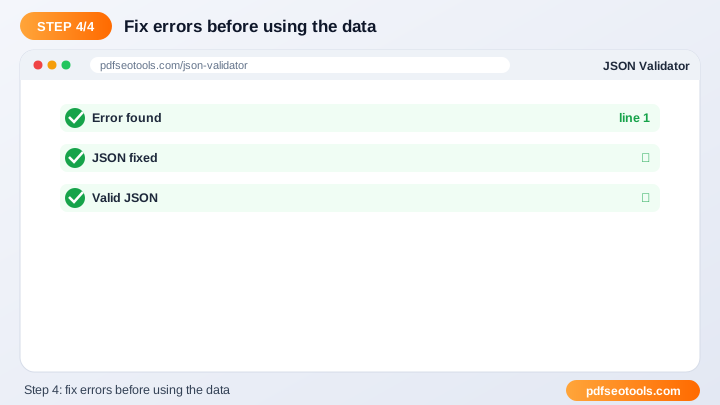
Example: an API returns one long line of JSON and the app crashes. Pasting it into a JSON Validator reveals a trailing comma on line 1; after removing it, the formatter shows clean, indented data that is easy to debug.
Quick Reference Table
| Feature | JSON | XML |
|---|---|---|
| Syntax | Key–value pairs, arrays | Nested tags |
| Readability | Compact | Verbose |
| Comments | Not allowed | Allowed |
| Common use | Web APIs, configs | Feeds, sitemaps, legacy APIs |
Glossary of Key Terms
- JSON
- JavaScript Object Notation – a lightweight data format of keys and values.
- XML
- Extensible Markup Language – a tag-based data format.
- Validation
- Checking that data follows the correct syntax rules.
- Minify
- Removing spaces and line breaks to make data smaller.
- UUID
- A 128-bit identifier that is practically unique.
Best Practices
Validate data before using it, never paste secrets such as API keys into shared tools or snippets, keep consistent indentation in your project and use generated test data only in development.
How It Works Behind the Scenes
Your data is parsed using a standards-compliant parser. If it is valid, it is transformed – formatted, converted or generated – and returned instantly. If it is invalid, the tool shows where the error is so you can fix it.
Key Takeaways
- Most developer tools problems come from a few simple causes: the wrong input, the wrong settings or a file or value that breaks a basic rule.
- Validate data before using it in production.
- Keep sensitive keys and passwords out of shared snippets.
- Use the free JSON Validator to get the job done in seconds.
Related Free Tools
- JSON Formatter – Format and pretty-print JSON with proper indentation online.
- JSON Editor – Edit JSON data online with a simple, structured editor.
- JSON Beautifier – Beautify messy or minified JSON into clean, readable code.
Explore all Free Developer Tools on pdfseotools.com.
Frequently Asked Questions
What are common JSON errors?
Trailing commas, single quotes and missing brackets.
Is it free?
Yes.
Is my data private?
Yes, it is not published.
Is it free to use?
Yes. All tools mentioned in this guide are free on pdfseotools.com, with no sign-up and no installation.
Does it work on mobile?
Yes. The tools work in Chrome, Safari, Firefox and Edge on Android, iPhone, Windows and Mac.
Conclusion
Common JSON Errors and How to Fix Them is quick and easy with the right tool. Bookmark the JSON Validator and explore more developer tools to finish your work faster – free, secure and on any device.