Website Management Tools
Free webmaster tools for SEO score, XML sitemaps, redirects, HTTP headers, QR codes, minifiers and mobile tests. Fast, free and easy to use.
- Website SEO Score Checker
- Website Screenshot Generator
- Online HTML Viewer
- WordPress Theme Detector
- Get HTTP Header
- Htaccess Redirect
- Mobile Friendly Test
- Adsense Calculator
- Screen Resolution Simulator
- Twitter Card Generator
- Open Graph Generator
- Xml Formatter
- HTML Minifier
- Javascript Minifier
- CSS Minifier
- Online Ping Website Tools
- URL Opener
- URL Encoder Decoder
- Base64 Encode Decode
- QR Code Generator
- XML Sitemap Generator
- HTML Editor
- Bulk Email Validator
- Bilibili Video Downloader
- Dailymotion Video Downloader
Free Webmaster Tools – SEO, Sitemap & Speed
Free Webmaster Tools – SEO, Sitemap & Speed
- 🧰 25 free tools
- 💸 100% free
- 🔓 No sign-up
- 📱 Works on any device
- 🔒 Secure HTTPS
Webmaster tools help you build, optimise and maintain a website – from SEO audits and sitemaps to redirects, minification and QR codes.


All 25 Free Website Management Tools

 WordPress Theme DetectorFind out which WordPress theme and plugins any website is using

 Twitter Card GeneratorGenerate Twitter (X) Card meta tags so your links show a rich preview with image, title and description

 Open Graph GeneratorCreate Open Graph meta tags for perfect link previews on Facebook, WhatsApp, LinkedIn and more

 Online HTML ViewerView and test HTML code online with a live preview

 Xml FormatterFormat and beautify XML online with proper indentation

 Website SEO Score CheckerCheck the SEO score of any website for free and get a detailed report with fixes

 Website Screenshot GeneratorCapture full screenshots of any website online in seconds

 Online Ping Website ToolsPing your website and notify search engines and blog directories about new content

 URL Encoder DecoderEncode and decode URLs online

 Base64 Encode DecodeEncode text to Base64 and decode Base64 back to text online

 QR Code GeneratorCreate free QR codes for URLs, text, Wi-Fi, phone numbers and more

 HTML EditorWrite, edit and preview HTML online with a live editor

 HTML MinifierMinify HTML code to reduce page size and speed up your website

 Javascript MinifierMinify JavaScript code online to make files smaller and faster to load

 CSS MinifierMinify CSS code online to reduce stylesheet size and improve page speed

 URL OpenerOpen multiple URLs at once in new tabs with one click

 XML Sitemap GeneratorGenerate an XML sitemap for your website and help Google crawl all your pages

 Get HTTP HeaderCheck the HTTP response headers of any URL – status code, cache, security and redirect headers

 Htaccess RedirectGenerate .htaccess redirect rules for www, non-www and HTTPS

 Mobile Friendly TestTest whether your website is mobile friendly and see how it looks on phones

 Adsense CalculatorEstimate your Google AdSense earnings based on page views, CTR and CPC

 Screen Resolution SimulatorPreview your website at different screen resolutions and device sizes

 Bulk Email ValidatorValidate email addresses in bulk to check syntax and domain mail servers

 Bilibili Video DownloaderDownload Bilibili videos online by pasting the video link

 Dailymotion Video DownloaderDownload Dailymotion videos online by pasting the video URL
| Tool | What it does | Input / Best for |
|---|---|---|
| WordPress Theme Detector | Find out which WordPress theme and plugins any website is using | URL or code → result |
| Twitter Card Generator | Generate Twitter (X) Card meta tags so your links show a rich preview with image, title and description | URL or code → result |
| Open Graph Generator | Create Open Graph meta tags for perfect link previews on Facebook, WhatsApp, LinkedIn and more | URL or code → result |
| Online HTML Viewer | View and test HTML code online with a live preview | URL or code → result |
| Xml Formatter | Format and beautify XML online with proper indentation | URL or code → result |
| Website SEO Score Checker | Check the SEO score of any website for free and get a detailed report with fixes | URL or code → result |
| Website Screenshot Generator | Capture full screenshots of any website online in seconds | URL or code → result |
| Online Ping Website Tools | Ping your website and notify search engines and blog directories about new content | URL or code → result |
| URL Encoder Decoder | Encode and decode URLs online | URL or code → result |
| Base64 Encode Decode | Encode text to Base64 and decode Base64 back to text online | URL or code → result |
| QR Code Generator | Create free QR codes for URLs, text, Wi-Fi, phone numbers and more | URL or code → result |
| HTML Editor | Write, edit and preview HTML online with a live editor | URL or code → result |
| HTML Minifier | Minify HTML code to reduce page size and speed up your website | URL or code → result |
| Javascript Minifier | Minify JavaScript code online to make files smaller and faster to load | URL or code → result |
| CSS Minifier | Minify CSS code online to reduce stylesheet size and improve page speed | URL or code → result |
| URL Opener | Open multiple URLs at once in new tabs with one click | URL or code → result |
| XML Sitemap Generator | Generate an XML sitemap for your website and help Google crawl all your pages | URL or code → result |
| Get HTTP Header | Check the HTTP response headers of any URL – status code, cache, security and redirect headers | URL or code → result |
| Htaccess Redirect | Generate .htaccess redirect rules for www, non-www and HTTPS | URL or code → result |
| Mobile Friendly Test | Test whether your website is mobile friendly and see how it looks on phones | URL or code → result |
| Adsense Calculator | Estimate your Google AdSense earnings based on page views, CTR and CPC | URL or code → result |
| Screen Resolution Simulator | Preview your website at different screen resolutions and device sizes | URL or code → result |
| Bulk Email Validator | Validate email addresses in bulk to check syntax and domain mail servers | URL or code → result |
| Bilibili Video Downloader | Download Bilibili videos online by pasting the video link | URL or code → result |
| Dailymotion Video Downloader | Download Dailymotion videos online by pasting the video URL | URL or code → result |
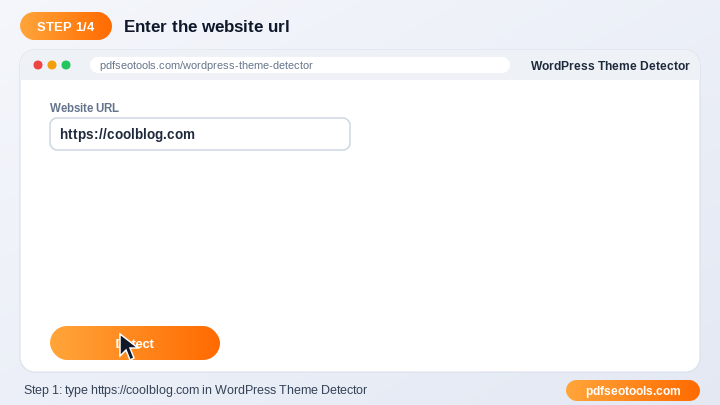
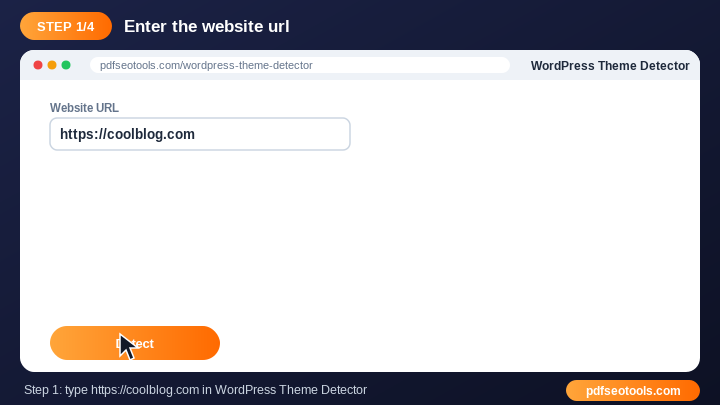
WordPress Theme Detector
The detector scans a site's public source code to identify the WordPress theme name, author and visible plugins – handy when you like a design.
Open WordPress Theme Detector →Twitter Card Generator
Twitter Cards control how your page looks when shared on X. A rich card with an image gets more clicks than a plain link.
Open Twitter Card Generator →Open Graph Generator
Open Graph tags (og:title, og:image, og:description) tell social platforms what to display when someone shares your URL.
Open Open Graph Generator →Online HTML Viewer
An HTML viewer renders your code in the browser so you can see how it looks without creating files or a server.
Open Online HTML Viewer →How to Use Our Website Management Tools
- Enter the URL, code or details requested by the tool.
- Select any options shown on the page.
- Click the main button to run the tool.
- Review, copy or download the result.
Website Management Tools – Quick Reference
| Status code | Meaning | SEO effect |
|---|---|---|
| 200 | OK – page loaded | Indexable |
| 301 | Moved permanently | Passes ranking signals |
| 302 | Moved temporarily | Original URL kept |
| 404 | Not found | Remove or redirect |
| 500 | Server error | Fix quickly |
Why Use Our Webmaster Tools?
- Made for webmasters Solves everyday website tasks in one place.
- Fast results Get output or reports in seconds.
- Free Use the tool at no cost.
- No technical setup No plugins or server access needed to try it.
- Works on any device Desktop, tablet and mobile supported.
- SEO friendly Helps you build faster, cleaner and better-optimised websites.

Tips for Using Website Management Tools
- Test changes on a staging site before going live.
- Keep a backup of files before you replace them.
- Re-run the tool after every major update.
- Combine it with our SEO Score Checker for a complete audit.
Website Management Tools – Worked Example
Example: a site can be opened at four addresses – http, https, with and without www. Adding a 301 redirect in .htaccess sends every version to https://www.yoursite.com, so search engines see one preferred URL instead of four duplicates.
Website Management Tools Glossary
- Sitemap
- An XML file listing the URLs you want search engines to crawl.
- 301 redirect
- A permanent redirect that passes ranking signals to the new URL.
- Minification
- Removing unnecessary characters from code to reduce size.
- HTTP headers
- Information a server sends with every response, such as status and caching.
- Core Web Vitals
- Google's page experience metrics for loading, interactivity and visual stability.
Helpful Guides for Website Management Tools
- 📘How to Create an XML Sitemap and Submit It to GoogleBuild an XML sitemap for your website, check it for errors and submit it to Google Search Console so new pages get found and indexed faster.
- 📘How to Check Your Website SEO Score and Improve ItCheck your site's SEO score for free, understand each issue in the report and fix the ones that matter most for higher Google rankings.
- 📘How to Redirect HTTP to HTTPS and www Using .htaccessForce HTTPS and your chosen www or non-www version with one 301 rule in .htaccess – free generator, copy-paste code and how to test it.
- 📘How to Create a QR Code for a Link, Menu or Business CardMake a free QR code for a link, menu, contact card, email or SMS. Tips on size, colours, logos and testing before you print it.
- 📘How to Minify HTML, CSS and JavaScript to Speed Up Your SiteMinify HTML, CSS and JavaScript to cut file size and speed up page loads. What minification removes, when to use it and how to test it.
- 📘12 Free Webmaster Tools Every Website Owner NeedsTwelve free webmaster tools for every site owner: SEO audit, sitemap, robots.txt, redirects, SSL and speed checks in one place.
Frequently Asked Questions
Are these webmaster tools free?
Yes. Every tool in this category is free to use on pdfseotools.com with no sign-up.
Do the tools work on mobile?
Yes. They work in any modern browser on Android, iPhone, Windows and Mac.
Is my data safe?
Yes. Connections use HTTPS and uploaded files are removed after processing.
Do I need to install software or create an account?
No. Everything runs in your web browser on Windows, Mac, Android and iPhone – there is nothing to download, nothing to install and no account to create.
Is there a limit on how often I can use these tools?
You can use the tools as often as you need for normal everyday tasks. Very large files or extreme usage may be limited to keep the service fast for everyone.
Where can I find more free tools?
Open the menu or the categories on pdfseotools.com to browse 150+ free tools for PDFs, images, text, SEO and development.